
Optimize (Bayesian optimization)
How Bayesian optimization chooses the next experiment, the engines and acquisition functions, and how to run, check and stop a campaign.
How it chooses the next experiment
Bayesian optimization (BO) decides which experiment to run next. It fits a statistical model, a Gaussian process (GP), to the results you have. For every setting x you have not tried, the model gives a prediction μ(x) and an uncertainty σ(x). An acquisition function turns μ and σ into one score, and the setting with the highest score is the next experiment. You run it, record what you measured, and the model is fitted again.
Engines and models
| Engine | Library | Model | Acquisition functions | Use it for | Cost and plan |
|---|---|---|---|---|---|
| Standard BO | acquilab-bo, AcquiLAB's own NumPy/SciPy engine | GP. Improved model 0.2.0 (default for new campaigns): a length scale per parameter, estimated noise, down-weighting of results that disagree with their neighbours (leave-one-out |z| > 3), and the result modelled as measured, as a logarithm or with the scale chosen automatically. Simpler model (Standard 0.1.0): one length scale and the noise you report, to reproduce an earlier campaign exactly. | EI with ξ (default 0.01) over a pool of candidates (default 4096); with outcome limits, EI times the chance the limits hold | One objective, one experiment per round. The only engine with the model map, model check, outcome limits, simulation as a guide and “Why this experiment?” | Free on every plan |
| Advanced BO | BoTorch 0.15.1 on GPyTorch and PyTorch 2.13 (CPU) | BoTorch Gaussian process | qLogNEI, qLogEI, qUCB (β), LogPI | Batches of 1–16 experiments per round (plates, parallel reactors), noisy data, explicit control of exploration | Free on every plan |
| Multi-objective (MOBO) | BoTorch | A GP for each objective | qLogEHVI, qLogNEHVI, qEHVI (hypervolume improvement) | 2–4 competing goals: yield and cost, sensitivity and selectivity, activity and stability | 1 run per suggestion; Pro and Team |
| Simulation in the loop | acquilab-bo driving the simulation service | Improved model, result scale chosen automatically | EI | AcquiLAB chooses and runs simulations itself, on a ready-made model or on the parameters of a model you wrote | Runs for each simulation; Plus and up (in the beta, any account with runs) |
Variables can be continuous (lowest, highest, unit, optional step), integer, or categorical (a list of choices such as catalyst or solvent). A campaign can have up to 50 variables. Linear constraints (for example E1 + E2 + E3 = 3 µM, or a ratio limit) and forbidden combinations are set in the wizard under Limits or later under Edit → Rules from known chemistry.
EI, UCB, PI and the rest
All of them answer the same question: is it worth testing x, given the prediction μ(x) and the uncertainty σ(x)? They differ in how much they value uncertainty (exploration) against a good prediction (exploitation). Below, f* is the best result so far, Φ and φ are the normal distribution and density, and z = (μ − f* − ξ)/σ. Written for maximisation.
| Acquisition | Formula | Behaviour | Knob |
|---|---|---|---|
| PI · probability of improvement | PI = Φ(z) | The chance of beating f* by at least ξ, regardless of by how much. Greedy: it keeps sampling right next to the best point. In AcquiLAB's benchmarks LogPI ranked last on all three test problems. | ξ: larger asks for a bigger improvement and explores a little more |
| EI · expected improvement | EI = (μ − f* − ξ)·Φ(z) + σ·φ(z) | The average size of the improvement. The first term rewards a good prediction, the second rewards uncertainty, so it balances both without tuning. The safe default. “Why this experiment?” splits a suggestion into these two terms (improve and learn). | ξ (default 0.01): raise to 0.05–0.1 to explore more |
| LogEI / qLogEI | log EI, computed stably | The same choice as EI in principle, but EI becomes numerically zero almost everywhere late in a campaign or in many dimensions, and the optimiser loses its way. The log form keeps a usable gradient (Ament et al., NeurIPS 2023). The q-version picks a batch of q points together. | ξ, batch size q |
| qLogNEI · noisy EI | E over noise of LogEI against the uncertain best | Treats the best so far as uncertain too, so one lucky noisy measurement doesn't trap the search. Handles batches and pending experiments. The best default when replicates disagree by more than a few percent. | batch size q |
| UCB / qUCB · upper confidence bound | UCB = μ + √β · σ | Optimism under uncertainty: each point is scored by how good it could plausibly be. You control the balance directly: β ≈ 0.1–0.5 exploits (polishing), β ≈ 1–4 balances, β > 4 explores and maps the space. It does not depend on f*, so it behaves well with noisy or drifting data. | β (AcquiLAB's examples use 2) |
| EHVI, qEHVI, qLogEHVI, qLogNEHVI | expected gain in Pareto hypervolume | For 2–4 objectives. The hypervolume is the region dominated by your best trade-offs above a reference point; a suggestion is worth its expected increase. qLogEHVI is the stable log form, qLogNEHVI also handles noisy measurements, qEHVI is the original form. | reference point, batch size |
Which to use when
| Your situation | Choose | Why |
|---|---|---|
| New campaign, one objective, one experiment at a time, results fairly reproducible | Standard BO · EI · Improved model (the wizard default) | Robust default, and you get the model map, model check and explanations. |
| Replicates scatter (biology, sensors, catalysis screens) | Improved model (estimated noise and down-weighting) or Advanced · qLogNEI | Both stop a single noisy high value from being treated as the true best. |
| You run 3–8 experiments in parallel (well plate, reactor block) | Advanced · qLogNEI (or qUCB) with experiments per round = slots | Batch acquisitions pick points that are good together instead of eight copies of the same idea. |
| Early stage, the space is unknown, you want a map | qUCB with β 3–5, or EI with ξ 0.05–0.1 | Rewards uncertainty and spreads the experiments out. |
| Late stage, near the optimum, few runs left | qUCB β 0.5–1 or qLogEI | Concentrates on the predicted best region. |
| Many parameters (6 or more) or a long campaign where EI goes flat | qLogEI / qLogNEI | The log form keeps the optimiser moving where EI underflows to zero. |
| A response that behaves like a product (rates, yields, activities) | Improved model with the result scale set to Choose automatically or Logarithm | Modelling the logarithm can turn an unreliable model into a reliable one; the model check suggests it when it helps. |
| A secondary result must meet a spec (purity ≥ 95 %, cost ≤ X) | Improved model + outcome limits | Models each limit and multiplies EI by the chance that all limits hold. |
| Two to four goals that conflict | Multi-objective · qLogNEHVI (noisy) or qLogEHVI (clean) | Finds the Pareto front; then set priorities (Ignore … Top) to rank it. |
| Mixture or ratio with a fixed total | Limits → These add up to a total | Every suggestion is a complete mixture; one part is computed as the rest. |
| A concentration, loading or dose over several decades | Log scale for that variable (the Setup check suggests it) | Low and high values get equal attention instead of most suggestions landing near the top. |
| Catalyst, solvent, buffer type | Categorical variables | No invented numeric order between choices. |
| You also have a simulation of the same system | Improved model with Use simulation results as a guide | Simulations enter as a cheaper source with their own length scale; only lab results count as the best. |
| The simulation itself is the experiment | Simulation in the BO loop | AcquiLAB runs the model inside the loop; no lab work. |
| You want the optimum fast and don't care about the model | Avoid LogPI except for final polishing | Too greedy; it stalls in local optima. |
Running a campaign
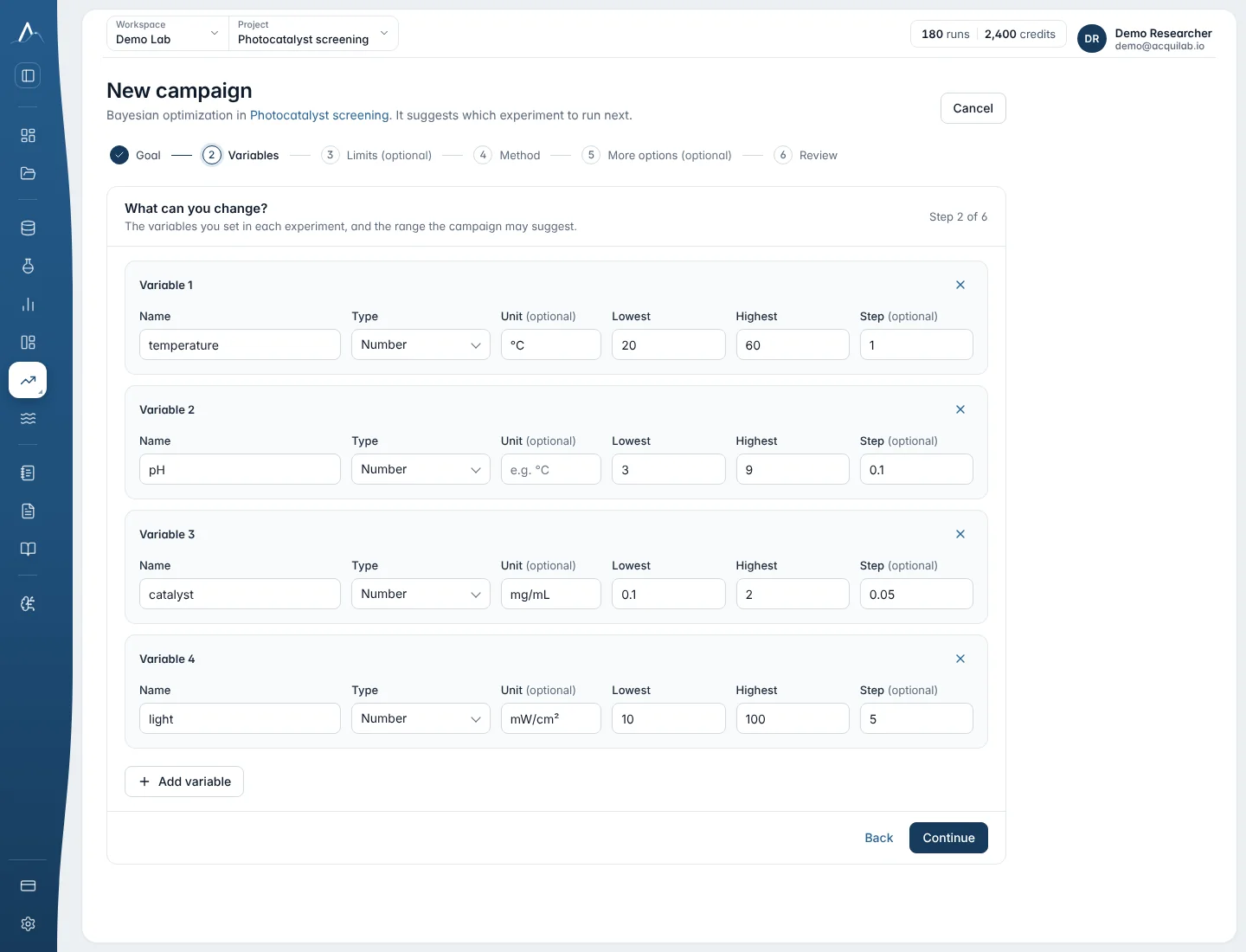
Optimize → Bayesian Optimization opens the campaign designer. It has six steps, and the defaults suit most campaigns.
| Step | What you set |
|---|---|
| Goal | Campaign name, the result you measure (objective name and unit), maximise or minimise, a description. |
| Variables | What you can change: name, type (continuous, integer, categorical), unit, lowest and highest value or the choices, and the scale of each number (Linear or Log). A log scale suggestion appears under the variable it is about. |
| Limits (optional) | Parts of a mixture (These add up to a total), sums and ratios such as total volume ≤ 10 mL, and combinations that must never be suggested; leave empty if every setting in the ranges is safe. |
| Method | Engine and acquisition function, experiments per round (Advanced BO: 1–16), the model (Improved, recommended, or Standard), outcome limits, and Use simulation results as a guide. |
| More options (optional) | Random seed, starting experiments, candidates scored per suggestion, exploration ξ, noise floor, largest grid. |
| Review | The Setup check, then create. The method and model can change later; variables are fixed once results exist. |
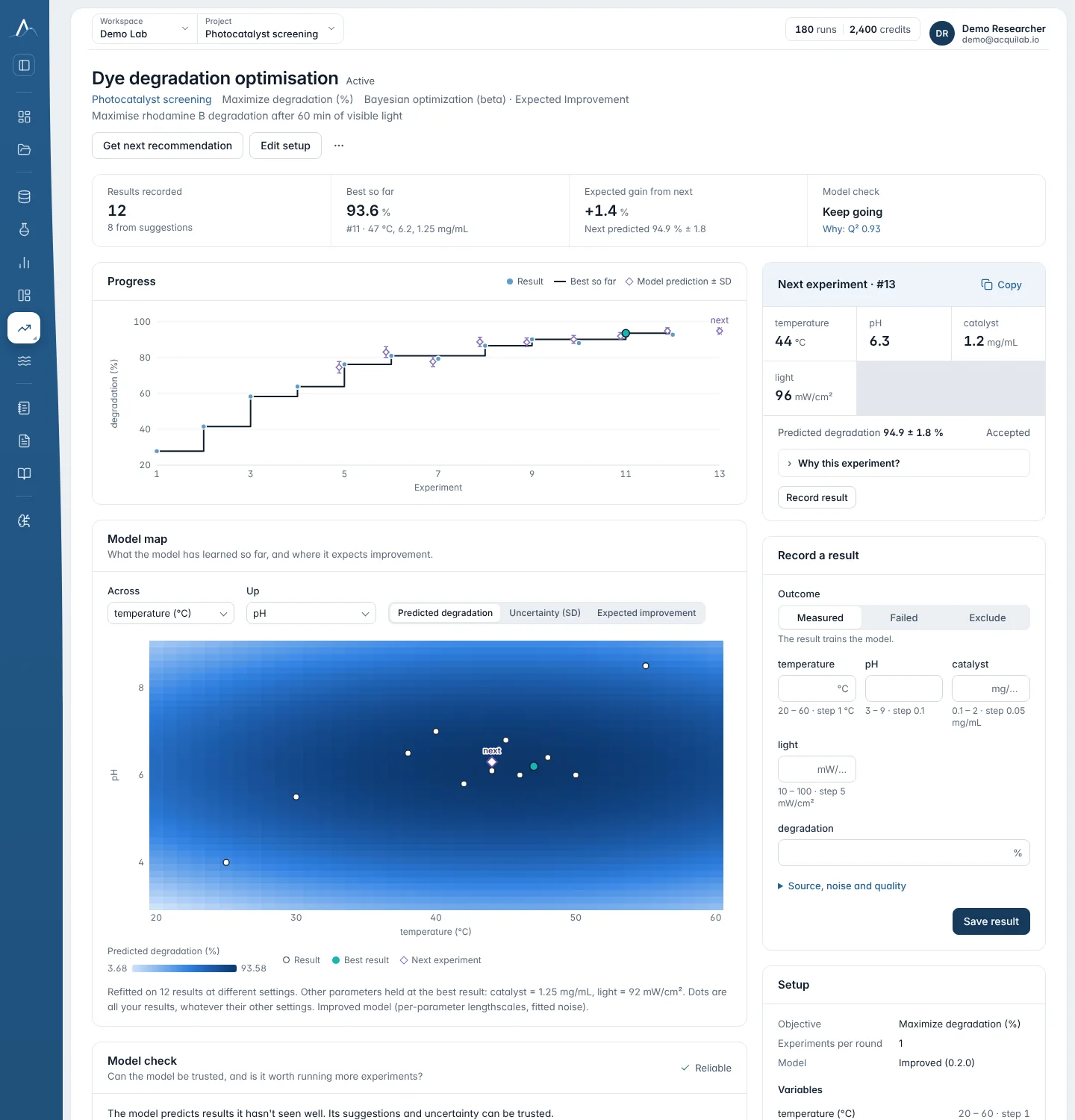
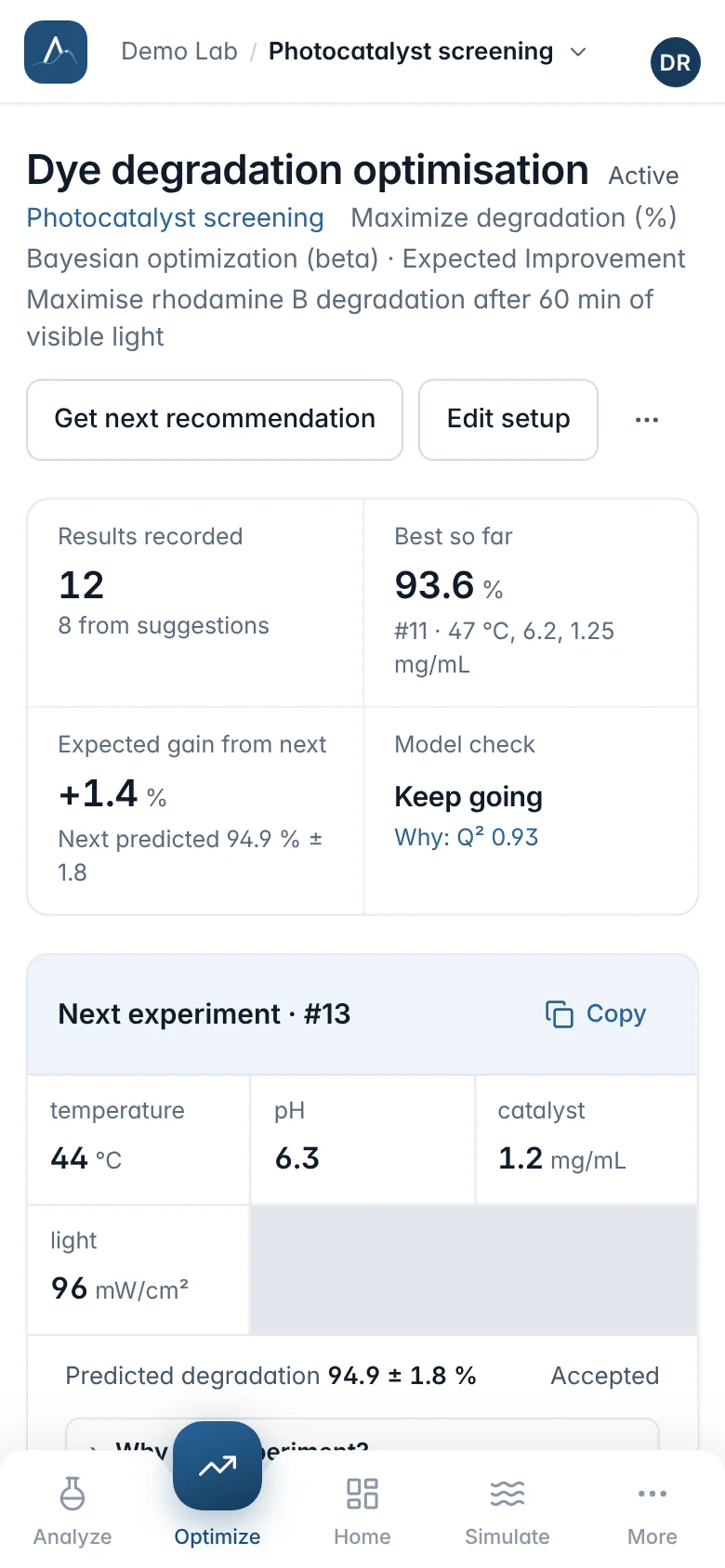
On the campaign page
- Start from what you know: Import past results takes a CSV, a pasted table or an earlier campaign. Otherwise run the starting experiments the campaign spreads across the ranges.
- Press Get next recommendation, run the experiment in the lab, and record the result (or mark it failed or excluded). A typo can be fixed once with Correct.
- Watch the model check and the model map (prediction, uncertainty and EI over one or two variables). Why this experiment? explains a suggestion.
- Pause, edit ranges or rules, and resume at any time. Add to document puts the campaign's best result and recent results into a report.
Setting up without BO experience
The campaign designer checks your setup while you fill it in and says in plain words what to change. Each piece of advice has Accept, which changes the setup for you, and Keep as is. The check only recommends: Create always works, whatever it says.
Scale per variable
Every number variable has Scale: Linear | Log. Linear spreads the search evenly over the range. Log spreads it evenly over each factor of ten, so 0.001–0.01 mg/mL gets as much attention as 1–10 mg/mL. With a linear 0.001–10 range, nine in ten suggestions would land above 1.
- Log needs a lowest value above 0, and 1 or more for whole numbers. Choices have no scale.
- Log is suggested for a number that spans 100× or more when its name or unit marks it as a quantity that behaves on a log scale: a concentration, loading, dose, amount, flow, pressure, time, molecular weight, enzyme activity, light intensity or frequency (M, mM, µM, mg/mL, mol%, wt%, mL/min, bar, min, U/mL and similar). Any other range of 1,000× or more gets a softer suggestion: most suggestions would land near the top of a linear range that wide.
- It is never suggested for temperature, pH, pKa, potential, angles or the parts of a mixture. If you choose log there, the check says why linear fits better.
- Keep linear hides the suggestion for this setup. Values, steps and limits always stay in your units; on a log variable the model map draws a log axis (0.001, 0.01, 0.1 …).
Mixtures: parts that add up to a total
In Limits, These add up to a total turns two or more number variables with the same unit into a mixture, such as TiO2 + g-C3N4 = 100 wt%. Choose the total (100 for a percentage) and which part is the rest (the last one unless you pick another).
- The rest is computed: total minus the other parts. Suggestions show it marked computed, the record form fills it in as you type the other parts, and the results table shows it.
- The lowest values must add up to no more than the total, and the highest values to at least the total. The rest has no step and stays linear. A variable belongs to one mixture; a campaign has up to five.
- The check suggests a mixture when variables in %, wt%, vol% or as fractions can add up to 100 % (or 1). Accept adds it.
The Setup check
The Review step lists what looks fine (a tick per variable) and what to consider. In Edit the same check is a one-line summary, for example “Setup check: 2 suggestions”, that opens on a click.
| Advice | When |
|---|---|
| Use a log scale | As above. Accept switches the variable to Log. |
| These look like parts of a mixture | Parts in %, wt%, vol% or fractions that can add up to the total. |
| Few experiments for this many settings | Enter Experiments you plan to run (used only by the check). Fewer than 4 per variable (6 for multi-objective) means the first suggestions mostly explore; fix the settings you already know. |
| Two settings tied together | Amount, concentration and volume of the same thing: optimise two of them, not all three. |
| Many choices | A choice with more than 8 options; start with the most promising ones. |
| Only a few whole numbers | A whole number with 3 or fewer values; Accept makes it a choice. |
| A step on a log scale | A fixed step removes the benefit of the log scale at the low end; Accept removes the step. |
| Outcome limits | A limit such as purity ≥ 95 % needs that value recorded with each result. |
In Edit, changing a scale or adding a mixture makes a new revision; recorded results are kept, and a mixture can be added only when the recorded parts already add up. Simulation loops (Simulate → Optimize) have the same scale control under each search range.
Model check and switching the model
The model check tells you whether to trust the suggestions. It refits the model leaving each result out in turn and reports Q² (how well left-out results are predicted), how many results fall inside the 95 % band, and a verdict: reliable, caution or unreliable, with a keep going? hint and converged when the suggestions stop improving.
A better model, one click away
When another model predicts your results clearly better (Q² higher by at least 0.1), the check names it, for example the Improved model or the Improved model on a log scale, and offers Switch model…. It opens Edit with those options set; save to apply.
Scale of the result
With the Improved model, Edit → Scale of the result: As measured, Logarithm (results must all be positive) or Choose automatically from the results. Automatic uses the log when every result is positive, there are at least five distinct settings and the log model predicts better. The check then says “log scale (chosen automatically)”.
Outcome limits
Other things you measure that must stay within a limit, such as purity ≥ 95 %. The model learns each one and suggests settings likely to meet them all. Adding a limit switches to the Improved model.
Simulation as a guide
Use simulation results as a guide: cheap simulation runs from a Simulate loop on this campaign show where to look. The model learns how far they are from the lab, and suggestions aim at the best lab result.
New campaigns, simulation loops and campaigns created by agents use the Improved model. Campaigns created earlier keep the model they were created with until you switch.
Multi-objective campaigns
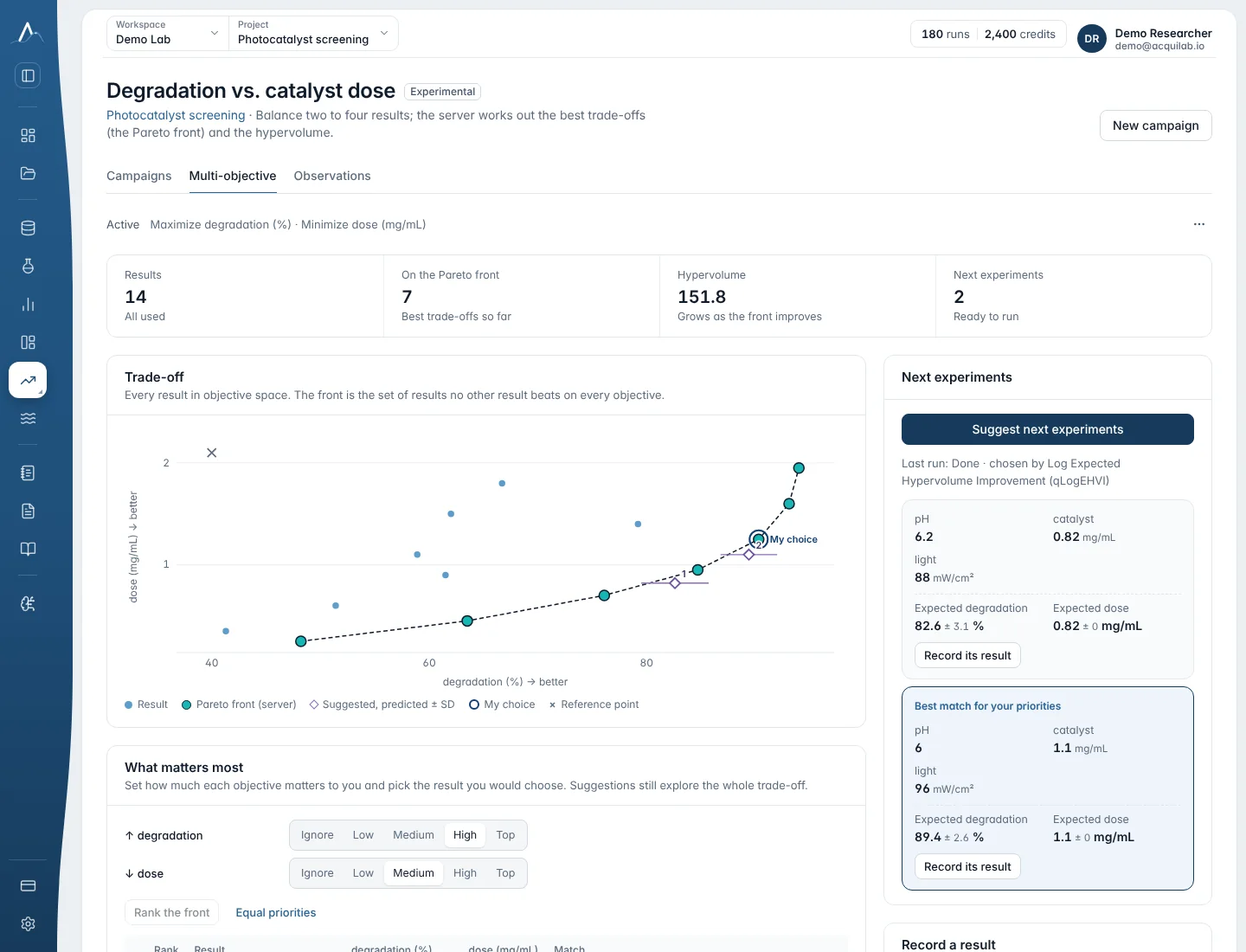
Optimize → Multi-objective (Pro and Team) handles two to four objectives that conflict. Instead of one best point it finds the Pareto front: the settings where no objective can improve without another getting worse.
| In the app | Method | When |
|---|---|---|
| Push the trade-off (recommended) | qLogEHVI | Picks experiments that should improve the best trade-offs the most. 1–4 per round. |
| For noisy results | qLogNEHVI | Treats recorded values as uncertain, so one lucky reading doesn't steer it. Slower. 1–4 per round. |
| Original method | qEHVI | Kept for comparison; the recommended method is usually better. Experimental. |
Set how much each objective matters (Ignore, Low, Medium, High, Top) to rank the front and pick a candidate. Each suggestion uses 1 run.
Campaigns through the MCP connector
An AI agent connected through the MCP connector creates and runs campaigns with the same engines:
create_optimization(
  name="Cu-catalysed coupling",
  parameters=[
    {"name":"temperature","minimum":40,"maximum":110,"unit":"°C"},
    {"name":"catalyst_loading","minimum":0.5,"maximum":5,"unit":"mol%"},
    {"name":"solvent","kind":"categorical",
     "choices":["DMF","DMSO","MeCN"]}],
  objective={"name":"yield","direction":"maximize","unit":"%"},
  batch_size=1)
check_optimization_setup(...)  # free: log scales, mixtures, budget
add_results(...)            # what you measured
suggest_next_experiments()  # free for one objective
explain_recommendation() # improve vs learn- Two to four objectives in
objectives=[…]make a multi-objective campaign. batch_sizegreater than 1 uses Advanced BO batches.- A single-objective campaign created this way uses the Improved model, as in the designer.
check_optimization_setupreviews a setup first (free, nothing is created) and returns the parameters with log scales switched on for recognised quantities spanning 100× or more; other advice is returned for the agent to show you.create_optimizationtakesscaleper parameter andcompositionfor parts that add up to a total.- Agents record only measured values, never predictions.
When to stop
- The model check says converged: recent suggestions no longer improve the predicted best.
- You reached the target you needed, or the experiment budget is spent.
- The model check stays unreliable after switching model: the variables may not explain the result. Revisit ranges, add a variable, or check the measurement.
A converged campaign has found a good region under its model; it does not prove a global optimum.